

AI Agent Block
The AI Agent block lets you add a conversational AI to your WhatsApp automation. The agent can hold multi-turn conversations, use a knowledge base to answer questions, and route users to specific flows when it detects intent (for example: “Talk to sales”, “Book a demo”, “Escalate to support”).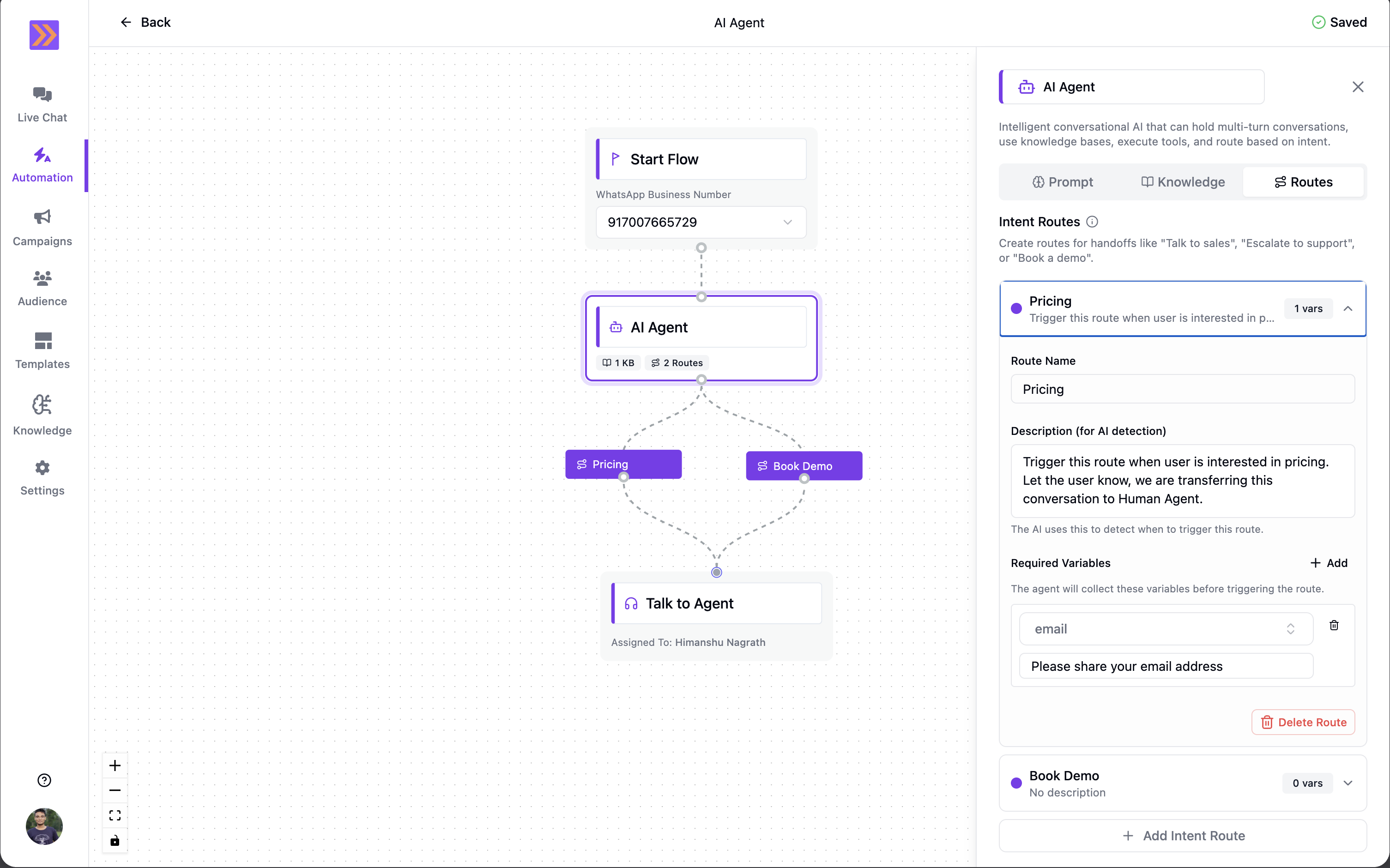
How It Works
- The AI Agent block waits for an incoming user message and immediately generates a reply.
- Each time the user sends a new message, the agent runs again (multi-turn loop).
- The agent uses:
- The system prompt (personality + rules)
- The connected knowledge base (grounded context for answering)
- The last ~20 conversation messages (recent chat history)
- The customer context (contact name/email/phone + saved attributes)
- If an intent route is triggered, the automation exits the agent and continues from the connected route path.
Key Components
- System Prompt Define the agent’s role, tone, and behavioral rules. This prompt applies to every message the agent generates.
-
Connected Knowledge Base
Select a knowledge base for the agent to reference while answering questions.
- The agent automatically searches the selected knowledge base for each user message.
- This helps keep answers more accurate and consistent with your business content.
-
Intent Routes
Intent routes are exit points from the AI Agent. Each route appears as a child “route node” on the canvas that you can connect to any next step (for example: a Talk to Agent block, a booking flow, or a lead capture flow).
Each route includes:
- Route Name: A clear, unique label (for example: “Talk to Sales”).
- Description (for AI detection): A short explanation of when this route should trigger.
- Required Variables: A list of attributes the agent must collect before triggering the route.
Required variables map to your workspace attributes. When a route triggers, the collected values are saved back to the contact, so you can use them in later blocks.
How Routing Works
- The agent evaluates your routes on every user message.
- When a route triggers, the automation transitions to that route node and immediately continues to whatever block you connected after it.
- If no route triggers, the agent stays active and waits for the next user message.
Common Use Cases
- AI-first support with escalation Let the agent answer from your knowledge base, then route to Talk to Agent when the user needs human help.
- Sales qualification Route “pricing / demo / quote” intent to a route that collects lead details (name, email, budget) before starting your sales flow.
- Routing by intent Create multiple exit routes (support, sales, order status, returns) and let the agent direct users to the right path automatically.
Example Use Case
You run a D2C store and want an agent that:- Answers product questions from a knowledge base
- Routes “Talk to Sales” requests to a sales flow
- Captures required details before routing
-
Prompt: Set a system prompt such as:
- “You are a helpful store assistant. Answer questions using the knowledge base. If the user asks for pricing or wants to buy, route to Talk to Sales. Keep replies short and precise.”
- Knowledge: Connect your “Products & Policies” knowledge base.
-
Routes: Add an intent route:
- Route Name: Talk to Sales
- Description: “Trigger when the user asks to talk to sales, asks for pricing, requests a quote, or wants to place a bulk order.”
- Required Variables:
- Email — “Ask for the customer’s email address.”
- Phone — “Confirm the best phone number to reach them on.”
Best Practices
- Keep route names unique: Treat route names as distinct actions (for example: “Escalate to Support”, “Book a Demo”, “Talk to Sales”).
- Be explicit in route descriptions: Include common phrases users will say (“agent”, “human”, “pricing”, “quote”, “demo”, “refund”).
- Write variable prompts as natural questions: The “required variable” description should read like what the agent should ask.
- Limit routes to clear intents: Too many overlapping routes can cause ambiguous triggers.
The AI Agent block is ideal when you want a human-like, multi-turn conversation experience that can still cleanly hand off into deterministic automation paths when the user intent is clear.