

Condition Block
The Condition block in Swiftsell’s WhatsApp automation builder works like a switch statement, allowing you to create intelligent, dynamic flows by evaluating multiple conditions and routing users to different branches. This powerful block checks each condition in order until it finds one that satisfies to true, then directs the user to that specific branch. If no conditions are met, users are redirected to a default branch.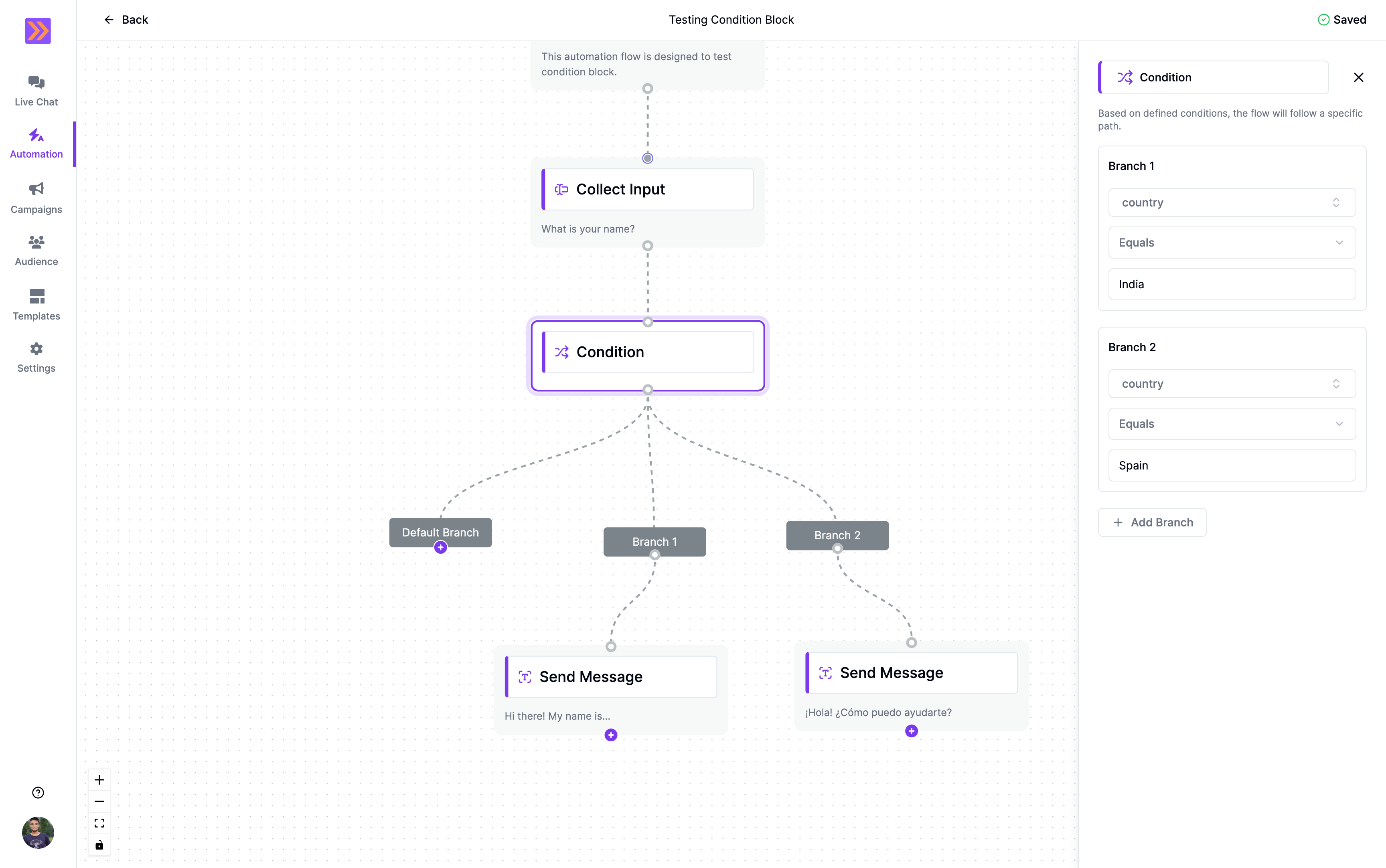
How It Works
- The Condition block functions as a switch statement, evaluating multiple conditions in sequence.
- It checks each condition in order until it finds the first one that evaluates to true.
- Once a matching condition is found, the user is immediately routed to that condition’s corresponding branch.
- If none of the conditions are satisfied, the user is automatically directed to the default branch.
- This switch-like behavior allows for complex multi-path routing based on different criteria.
Key Components
-
Multiple Conditions
Create multiple condition statements that will be evaluated in sequence.- Variable Selection: Choose from variables collected earlier in the flow, user attributes, or system data.
- Operators: Use comparison operators like equals, not_equals.
- Values: Set the values to compare against (static text, numbers, or other variables).
- Order Matters: Conditions are evaluated from top to bottom until a match is found.
-
Condition Branches
Each condition can have its own dedicated branch path:- Condition 1 Branch: The flow direction when the first condition is satisfied.
- Condition 2 Branch: The flow direction when the second condition is satisfied.
- Additional Branches: Continue adding conditions and their corresponding branches as needed.
-
Default Branch
A fallback path that activates when none of the defined conditions are satisfied:- Default Path: Ensures users always have a path to follow even when no conditions match.
Common Use Cases
-
User Segmentation
Route users based on their profile information, preferences, or previous interactions. -
Response Validation
Check if user inputs meet specific criteria (e.g., valid email format, phone number length). -
Dynamic Content
Show different messages or options based on user data or time-sensitive information. -
Escalation Logic
Automatically route conversations to human agents based on complexity or user tier.
Example Use Case
In a customer service automation, the Condition block could work as follows:- Condition 1: If user’s account status equals “VIP” → Route to VIP support with immediate agent assignment
- Condition 2: If user’s account status equals “Premium” → Route to priority support queue
- Condition 3: If user’s purchase history is greater than $1000 → Route to valued customer flow
- Default Branch: All other users → Route to standard support process
The Condition block’s switch-like functionality is essential for creating sophisticated, multi-path automation flows that can handle complex routing scenarios, making your WhatsApp automations more intelligent and capable of serving diverse user needs efficiently.