

List Block
The List block in Swiftsell’s WhatsApp automation builder allows you to present users with a scrollable list of up to 10 options. This block is ideal for scenarios where you want users to select from multiple choices, such as product categories, services, or appointment types, all within a single, organized menu.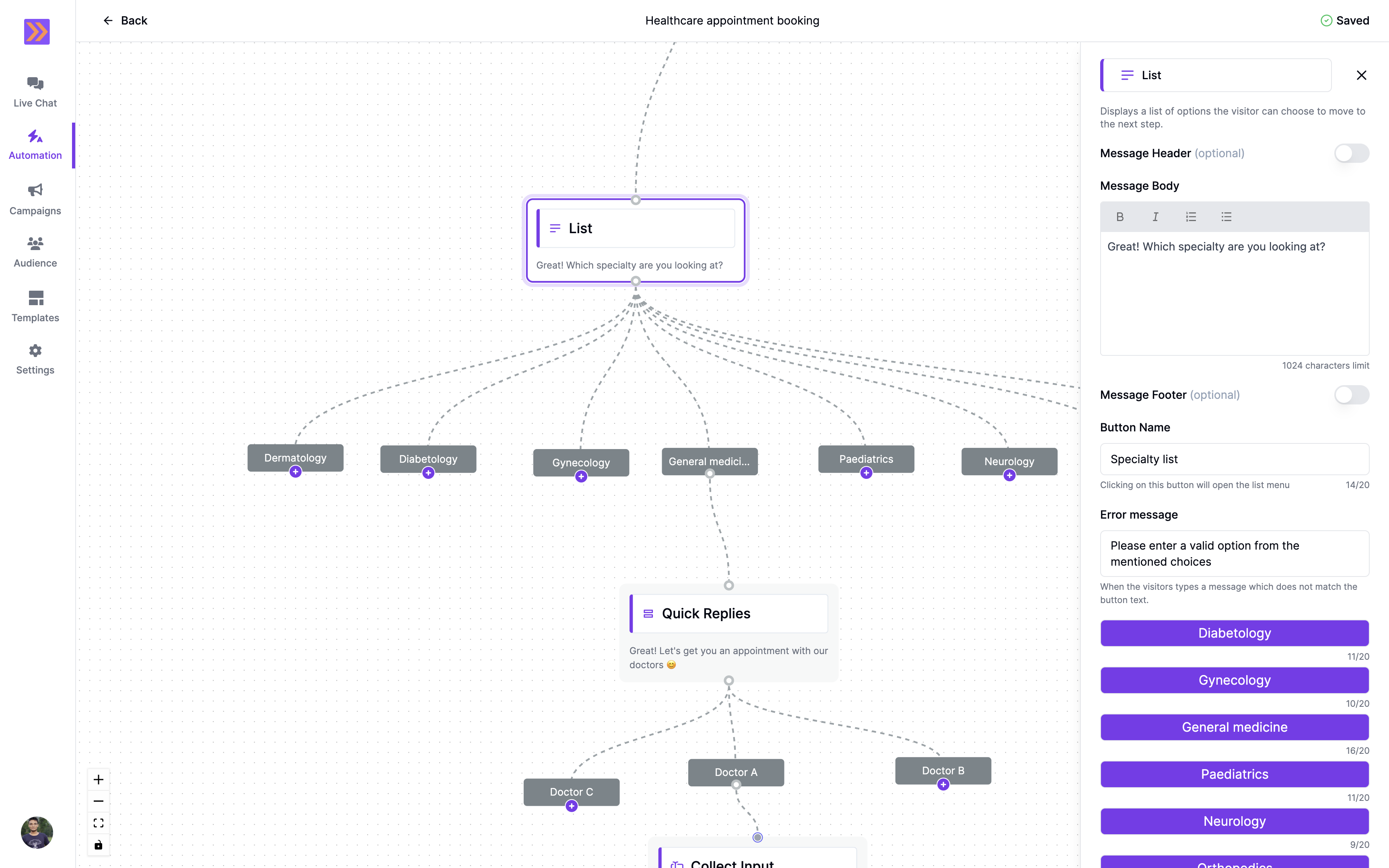
How It Works
- The List block displays a button in the chat. When clicked, it opens a scrollable drawer with up to 10 items for the user to choose from.
- Each list item can represent a different branch in your automation flow, enabling dynamic and personalized conversations.
- If the user enters a message that does not match any list item, a customizable error message is shown.
Key Components
-
Message Header (optional)
Add a header to provide context or highlight important information at the top of the list block. -
Message Body
Compose the main message shown above the list button.- Supports formatting: Bold, Italics, ordered and bulleted lists.
- Personalize messages using variables collected earlier in the flow.
You can insert variables using#inside the editor -
Button Name
Set the label for the button that opens the list menu. This should clearly indicate what the list contains (e.g., “Specialty list”). -
Message Footer (optional)
Include additional details or disclaimers below the list. -
Error Message
Define a custom error message shown when the user’s input does not match any of the list options. -
List Items
Add up to 10 items to the list. Each item represents a possible user selection and can branch to a different step in your automation.Item text is limited to 20 characters.
Example Use Case
In the screenshot above, the List block is used to ask, “Which specialty are you looking at?” with options like Dermatology, Diabetology, Gynecology, and more. Based on the user’s choice, the conversation flows to the relevant next step, streamlining the appointment booking process.The List block makes it easy to present multiple options in a clean, user-friendly way, improving engagement and guiding users efficiently through your WhatsApp automation flows.