

Talk to Agent Block
The Talk to Agent block in Swiftsell’s WhatsApp automation builder allows you to seamlessly transfer conversations from your bot to human agents when personalized assistance is needed. This block is essential for providing exceptional customer support by ensuring complex queries, escalations, or high-value interactions receive human attention.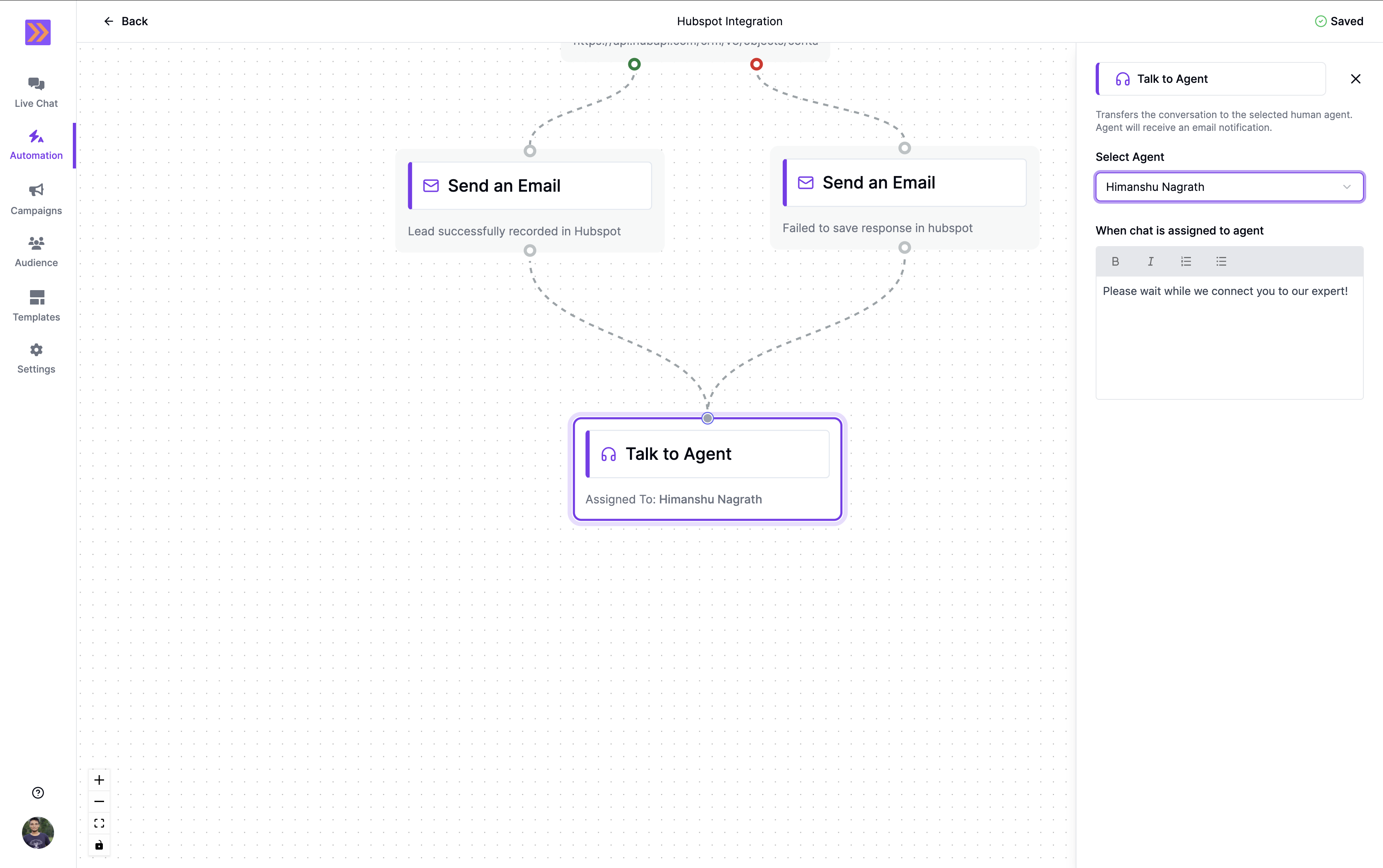
How It Works
- The Talk to Agent block transfers the active conversation from the bot to a selected human agent.
- When triggered, it sends a customizable message to the user informing them about the transfer.
- The assigned agent receives an email notification with conversation details and a direct link to the live-chat interface to take over the conversation immediately.
- The conversation then appears in the agent’s live chat dashboard for immediate handling.
- Once transferred, the bot automation stops, and the agent takes full control of the conversation.
Key Components
-
Select Agent
Choose from your team members who will handle the transferred conversation.- Agent Selection: Pick from a dropdown list of available team members in your workspace.
- Email Notification: The selected agent receives an immediate email notification with conversation context and a direct link to the live-chat interface.
- Live Chat Integration: The conversation appears in the agent’s live chat dashboard for instant access.
-
Message on Chat Assignment
Customize the message sent to the user when the conversation is being transferred.- Transfer Message: Compose a professional message informing the user about the handoff.
- Personalization: Use variables collected earlier in the flow to personalize the transfer message.
- Formatting Support: Supports Bold, Italics, ordered and bulleted lists for clear communication.
After this block executes, the bot automation ends and the human agent takes over the conversation completely.
Common Use Cases
-
Complex Product Inquiries
Transfer conversations when users ask detailed questions that require expert product knowledge or technical specifications. -
Sales Escalation
Route high-value prospects or customers ready to purchase to your sales team for personalized closing. -
Technical Support
Transfer users experiencing technical issues to specialized support agents who can provide hands-on assistance. -
Account Management
Connect existing customers to their dedicated account managers for relationship building and retention. -
Complaint Resolution
Escalate customer complaints or negative feedback to senior support agents for immediate resolution.
Example Use Case
In a customer support automation, the Talk to Agent block could be used as follows: After the bot attempts to resolve a customer’s issue through automated responses, if the customer indicates they’re still unsatisfied or need additional help, the bot can transfer them to a human agent with a message like: “I understand you need additional assistance. Let me connect you with one of our expert support agents who can provide personalized help. Please hold on while I transfer you.” The assigned support agent receives an email notification containing:- Customer’s name and contact information
- Conversation history and context
- Direct link to continue the conversation in live chat
- Timestamp of the transfer
Best Practices
- Strategic Placement: Position the Talk to Agent block after attempting automated resolution but before user frustration builds.
- Clear Communication: Use reassuring language in the transfer message to maintain customer confidence.
- Agent Availability: Ensure selected agents are available during business hours when the automation is active.
- Context Preservation: Collect relevant information before the transfer so agents have complete context.
- Follow-up: Consider triggering email notifications to supervisors for high-priority transfers.
The Talk to Agent block bridges the gap between automated efficiency and human empathy, ensuring customers receive the right level of support at the right time while maintaining seamless conversation flow.